


Key takeaways
- Product data errors cost B2B businesses staff time, delayed listings, order corrections and potentially lost sales.
- Multiply correction hours by a fully loaded hourly labour cost to estimate a baseline cost, then track other impacts separately.
- Required fields and format checks should reflect the product type and the channel receiving the data.
- Automated validation finds missing and inconsistent values, but people still need to verify whether plausible values are correct.
- Assign owners to reported errors and review exceptions regularly to prevent the same problems recurring.
The cost of product data errors includes staff time spent investigating and correcting records, delayed listings, order problems and potential lost sales. Start by measuring correction hours, then put checks in place before product information is published or shared with another system.
Where product data errors cost you money
A missing specification rarely stays a catalogue team's problem. A salesperson may need to call the supplier, a customer may order the wrong item, or a warehouse may have to resolve a mismatch before receiving stock.
- Staff time. Teams investigate the original value, contact suppliers, correct records and update affected channels.
- Delayed launches. A new range waits for dimensions, images or prices while the team chases the missing information.
- Order problems. An incorrect pack quantity or part number can lead to credits, replacements and extra freight.
- Margin pressure. A wrong price or unit of measure can leave the business absorbing the difference.
- Potential lost sales. Buyers may leave a product page or contact another supplier when they cannot confirm a specification.
In a 2024 Sana Commerce survey reported by Digital Commerce 360, 28% of 1,000 professional B2B buyers cited a lack of product information as a barrier to ordering online. The survey covered six countries, including Australia. It does not tell you how many sales your catalogue has lost.
The operational impact can be substantial too. GS1 New Zealand reported in 2025 that Foodstuffs teams spent weeks checking packaging dimensions and gross weights across thousands of products and shipping units.
How to estimate your correction cost
For one week, record time spent on errors after a product record has been created. Include investigating the issue, contacting the supplier, correcting the source record and fixing affected listings or orders. Record the product, cause and time spent so you can identify recurring problems.
Keep freight, credits and other direct costs in a separate total, without counting staff time twice. Track delayed listings by recording how long each range waits and why. These measures show the scale of the problem without pretending every delay has the same financial impact.
Estimate potential lost sales separately. For example, review enquiries where a buyer could not get a required specification and record the value of opportunities that did not proceed. Treat that value as an estimate, not proof that better data would have won every order.
What product data should you check?
Define a small set of required fields for each product type and destination. A furniture listing needs different details from an industrial spare part, and a connected system may need fields that do not appear on the website.
| Product type | Fields to check | Example validation |
|---|---|---|
| Industrial spare parts | Part number, manufacturer, compatibility | Require a part number and use an agreed format |
| Apparel and uniforms | Size, colour, SKU, variant price | Require size and colour for each sellable variant |
| Furniture | Dimensions, material, finish, weight | Require numeric dimensions with an agreed unit |
| Carton-based products | Pack quantity, unit of measure, gross weight | Require a positive pack quantity and consistent units |
Add price and availability checks where those fields are needed for the destination. Agree who can confirm each value, especially when the answer must come from a supplier rather than the catalogue team.
Standardising an incoming file is a useful first step, but it does not replace checks on later changes. For the earlier stage of the process, see how to clean up supplier product data.
Manual checks and automated validation
Manual checks are useful for verifying facts against a supplier specification, but checking every field by hand takes time and is easy to repeat inconsistently. Automated product data validation can apply the same missing-field and format rules across a range, then report exceptions for people to resolve.
A valid-looking value is not necessarily the right value. A rule can flag a blank weight or an unexpected format, but a weight entered in the correct format can still belong to the wrong product. Keep human verification for critical specifications, prices and unusual values.
Review the rules as products and channel requirements change. If a check repeatedly flags legitimate records, fix the rule or the underlying process rather than asking staff to ignore the warning.
Put a validation workflow in place this week
Start with one troublesome range or supplier, not the entire catalogue. Pick products that create regular enquiries, corrections or delays and agree what must be right before their data is shared.
- Choose the fields. List the required identifiers, specifications, prices and units for the product type and each destination.
- Set the checks. Identify missing values and agree formats, such as numeric dimensions in millimetres and consistent part numbers.
- Assign an owner. Nominate someone to review reported errors, find the correct value and update the source record.
- Review before sharing. Resolve exceptions before publishing or syncing the affected products, then verify important values against supplier information.
- Meet weekly. Review outstanding exceptions, correction hours and recurring causes. Update the rules or supplier instructions when the same issue keeps appearing.
Xada's data validation features run automated quality checks, detect missing fields and apply format rules to product information. Errors and alerts give the team a way to find issues and fix them at the source before information is published or shared with connected systems.
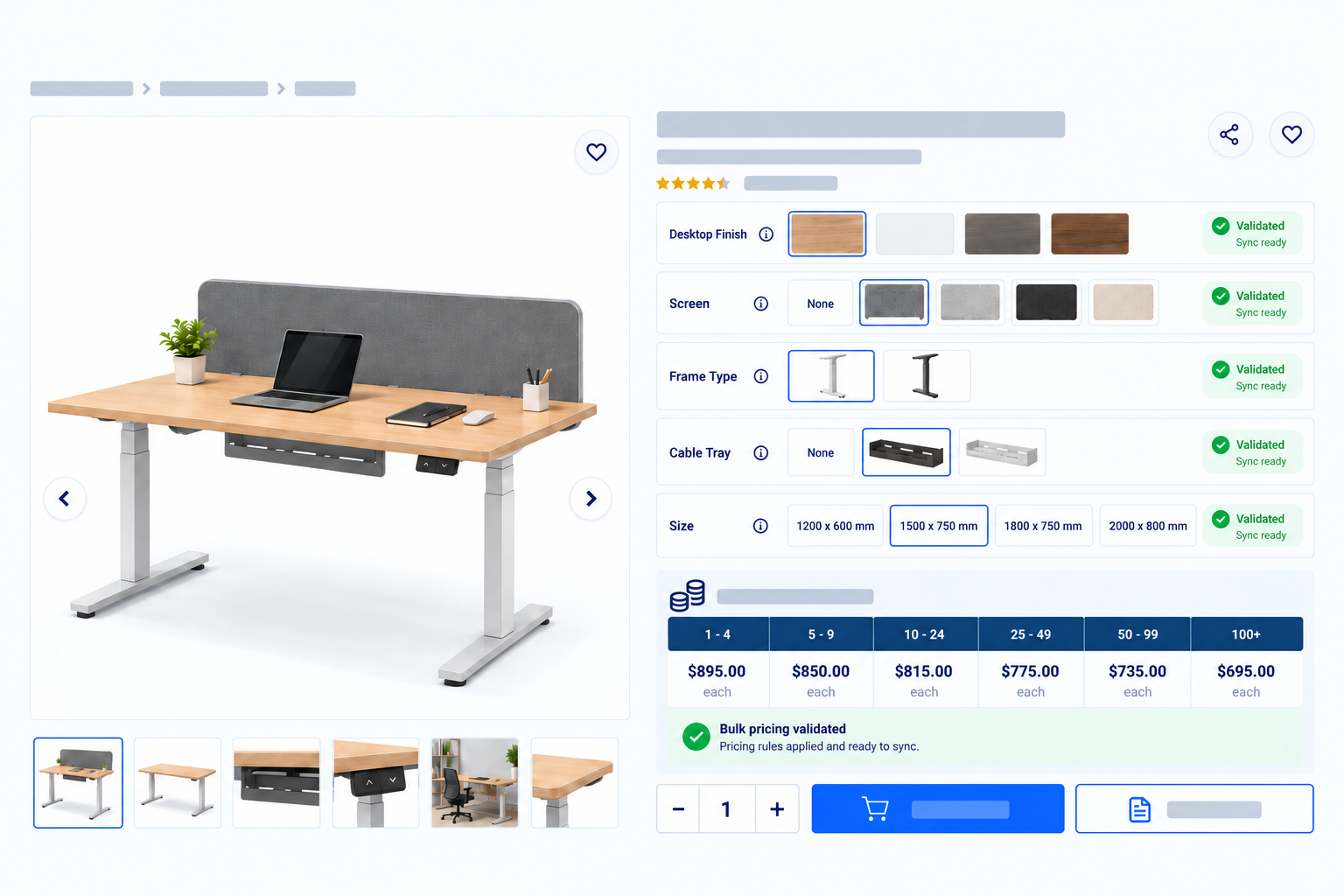
Keep a person responsible for reviewing exceptions and confirming factual accuracy. To map that process to your catalogue, talk to the Xada team about the range you want to tackle first.
Sources
Frequently asked questions
How much do product data errors cost a business?
Start with the hours spent investigating and correcting errors, multiplied by a fully loaded hourly labour cost. Add direct costs such as extra freight separately, and treat potential lost sales as an estimate rather than a confirmed loss.
How does incomplete product information affect B2B sales?
Missing specifications can stop a buyer from deciding whether a product suits their application, leading to enquiries, delays or a purchase elsewhere. In a 2024 Sana Commerce survey of 1,000 professional B2B buyers across six countries, 28% cited a lack of product information as a barrier to ordering online.
What product data should be checked before publishing?
Check required identifiers, prices, units and product-specific details such as dimensions, compatibility, sizes and colours. Set requirements for each product type and destination, then verify critical values against a reliable source.
How does automated validation differ from manual checking?
Automated validation applies defined checks for issues such as missing fields and inconsistent formats across product records. People still need to correct exceptions and verify facts, because a value can pass a format check and still be wrong.
How can a business stop incorrect data reaching connected systems?
Check required fields and formats before publishing or syncing, assign an owner to fix exceptions, and verify important values against supplier information. Review the exception list and validation rules regularly as the catalogue changes.